

Using an AI agent? Install the Meteora Agent Skill — it ships in the same repository (
skills/meteora) and teaches agents every action on this page with dry-run and confirmation safety gates built in.Prerequisites
- Node.js >= 22.12.0
- pnpm >= 10.0.0
Terminal
Steps
1
Clone and Setup Meteora Invent
Meteora Invent is a toolkit consisting of everything you need to invent innovative token launches on Meteora. Run the following command in your terminal to get started.Once you’ve cloned the repository, you’ll have a new project directory with a meteora-invent folder. Run the following to install pnpm and the project dependencies.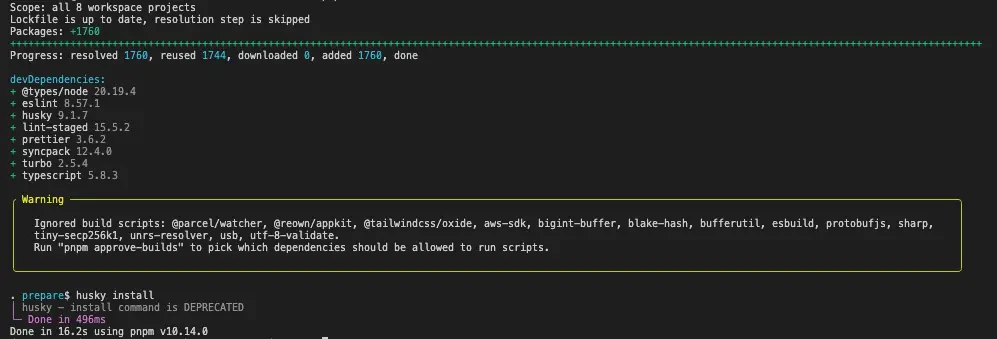
Terminal
Terminal
2
Setup Environment Variables
Copy the Configure the following variables:
.env.example file to .env and configure the environment variables.Terminal
PRIVATE_KEY- Your private key for the wallet you will be using to deploy the pool.
3
Optional: Start a Local Test Validator
You can also run the studio scripts on localnet - http://localhost:8899 with the following commandThis will start a local validator on your machine which will be hosted on
Terminal
http://localhost:8899.4
Generate Keypair
Generate a keypair from your private key:This will generate a
Terminal
keypair.json file in the studio directory which will be used for all actions.5
Configure Pool Settings
Configure the config files in the
studio/config directory.- Configure DLMM
- Configure DAMM v2
- Configure DAMM v1
- Configure DBC
- Configure Alpha Vault
- Configure Presale Vault
- Configure Met Lock
- Configure Dynamic Vault
- Configure Dynamic Fee Sharing
- Configure Pool Farms
- Configure Zap
Timestamp fields in these templates ship as placeholder dates that have already passed. Replace them with future values before you run an action that uses them, such as a presale end time, an Alpha Vault deposit window, or a vesting cliff.
Actions
DLMM
Launch a DLMM pool
Launch a DLMM customizable launch pool
Seed Liquidity
Seed Liquidity with your preferred curve
Seed Liquidity Single Bin
Seed Liquidity in a single bin
Set Pool Status
Set your DLMM Pool Status
Place a Limit Order
Place a bid or ask limit order on your DLMM pool
Get Limit Orders
List your open limit orders with fill status
Cancel a Limit Order
Cancel limit orders and withdraw proceeds
Swap
Swap tokens on a DLMM pool with a quote and slippage protection
Claim Fees
Claim swap fees and LM rewards across your DLMM positions
Get Positions
List your DLMM positions with bin ranges, amounts, and unclaimed fees
DAMM v2
Launch a DAMM v2 balanced pool
Launch a DAMM v2 balanced pool
Launch a DAMM v2 one-sided pool
Launch a DAMM v2 one-sided pool
Split position
Split an existing LP Position on DAMM v2 pool
Claim Position Fee
Claim an existing DAMM v2 pool position fee
Add Liquidity
Add liquidity to an existing DAMM v2 pool position
Remove Liquidity
Remove liquidity from an existing DAMM v2 pool position (includes refresh vesting and closing position)
Close Position
Close an existing DAMM v2 pool position
Swap
Swap tokens on a DAMM v2 pool (Token-2022 aware)
Get Positions
List your DAMM v2 positions with liquidity and unclaimed fees
DAMM v1
Launch a DAMM v1 pool
Launch a DAMM v1 constant product launch pool
Lock Liquidity
Lock liquidity for a DAMM v1 pool
Create a Stake2Earn Farm
Create a Stake2Earn Farm for a DAMM v1 pool
Lock Liquidity for Stake2Earn Farm Pool
Lock liquidity for a Stake2Earn Farm pool
Swap
Swap tokens on a DAMM v1 pool
DBC
Launch a DBC token pool
Launch a Dynamic Bonding Curve token pool
Create a DBC Config
Create a Dynamic Bonding Curve config containing the settings for pre-graduation and post-graduation pools
Claim Trading Fees
Claim partner and/or creator trading fees for a DBC pool
Migrate to DAMM v1
Migrate your DBC pool to a DAMM v1 pool
Migrate to DAMM v2
Migrate your DBC pool to a DAMM v2 pool
Swap (Buy/Sell)
Swap (Buy/Sell) tokens on a DBC pool
Get Pool Status
Read graduation progress, migration state, reserves, and unclaimed fees
Alpha Vault
Create an Alpha Vault
Create an Alpha Vault with an already existing DAMM v1 or DAMM v2 or DLMM pool
Deposit
Deposit quote tokens into a vault, with the merkle proof fetched for you on permissioned vaults
Withdraw
Withdraw a deposit during the deposit phase of a prorata vault
Claim Tokens
Claim your vested tokens once the vault has bought from the pool
Withdraw Remaining Quote
Recover the unused portion of a prorata deposit after the vault has filled
Crank the Fill
Run the permissionless crank that buys from the pool until the vault is filled
Get Vault Status
Read the vault mode, phase, caps, and totals, plus your own escrow when a keypair is present
Presale Vault
Create a Presale Vault
Create a Fixed Price or FCFS or Prorata Presale Vault
Deposit
Deposit quote tokens into a presale tier, creating your escrow in the same transaction
Withdraw
Withdraw a deposit while the presale still allows it
Claim Allocation
Claim your purchased tokens, including the vesting schedule when one is set
Withdraw Remaining Quote
Sweep the unused quote left over across every tier you deposited into
Close Escrow
Reclaim escrow rent once your escrow is fully settled
Creator Withdraw
Withdraw the raise as the creator, optionally collecting the deposit fee
Handle Unsold Tokens
Refund or burn the base tokens the presale did not sell
Get Presale Status
Read progress, totals, average price, and per-tier state, or find a presale by its base mint
Met Lock
Create a Vesting Escrow
Lock any SPL or Token-2022 mint for a recipient on a cliff and vesting schedule
Create Escrow Metadata
Attach a name and contact details to an escrow so recipients can identify it
Claim Vested Tokens
Claim whatever has vested so far as the escrow recipient
Get Escrow
Read one escrow’s schedule, total locked, claimed, and claimable amounts
List Escrows
List every escrow where a wallet is the recipient or the creator
Stake2Earn
Stake
Stake tokens into a DAMM v1 pool’s fee farm to earn a share of trading fees
Claim Fees
Claim the fees your stake has earned in both pool tokens
Start an Unstake
Begin the unstake cooldown, saving the unstake address you will need to finish it
Cancel or Withdraw an Unstake
Cancel a pending unstake to restake, or withdraw once the cooldown has passed
Get Farm Status
Read the farm’s top-list threshold and your staked amount, pending fees, and open unstakes
Pool Farms
Stake LP
Stake DAMM v1 LP tokens into a reward farm
Unstake LP
Withdraw some or all of your staked LP tokens
Claim Rewards
Claim accumulated rewards from a single farm
Claim from Several Farms
Batch reward claims across a list of farms
Get Farm Status
Read the farm’s staking mint, total staked, reward schedule, and your own position
Dynamic Vault
Deposit
Deposit a token into its dynamic vault to earn lending yield on idle balances
Withdraw
Redeem vault LP shares back into the underlying token
Get Vault Status
Read total supply, withdrawable amount, virtual price, and your redemption value
Dynamic Fee Sharing
Create a Fee Vault
Split a fee stream between up to five recipients on fixed shares
Fund the Vault
Transfer tokens straight into a fee vault for distribution
Transfer a DAMM v2 Position
Hand a position’s NFT to the fee vault so the vault can claim its fees
Fund from DAMM v2 Fees
Claim a vault-owned position’s trading fees directly into the fee vault
Fund from DAMM v2 Rewards
Claim a vault-owned position’s reward emissions into the fee vault
Fund from DBC Fees
Route DBC creator or partner trading fees, surplus, or migration fees into the fee vault
Claim Your Share
Claim whatever your share of the vault has accrued
Get Vault Status
Read the recipient split, funded totals, and each share’s claimed and claimable amounts
Zap
Zap into a DAMM v2 Pool
Enter a DAMM v2 position with a single token, sourcing the other side from the pool itself
Zap into a DLMM Pool
Enter a DLMM position with a single token, pricing the rebalancing swap against Jupiter
Zap out of a Position
Remove liquidity from a DAMM v2 or DLMM position and exit into a single token